Case study · Clean Energy Solutions

One login now runs the whole business.

A solar and battery installer on the Border, rebuilt from the website in. Every lead lands in Pipedrive and on the sales manager's phone in seconds, every Simpro job sits in one pipeline, and customer care keeps in touch on time without the busywork.
staff.cesolutions.com.auBuilt by Automatrix
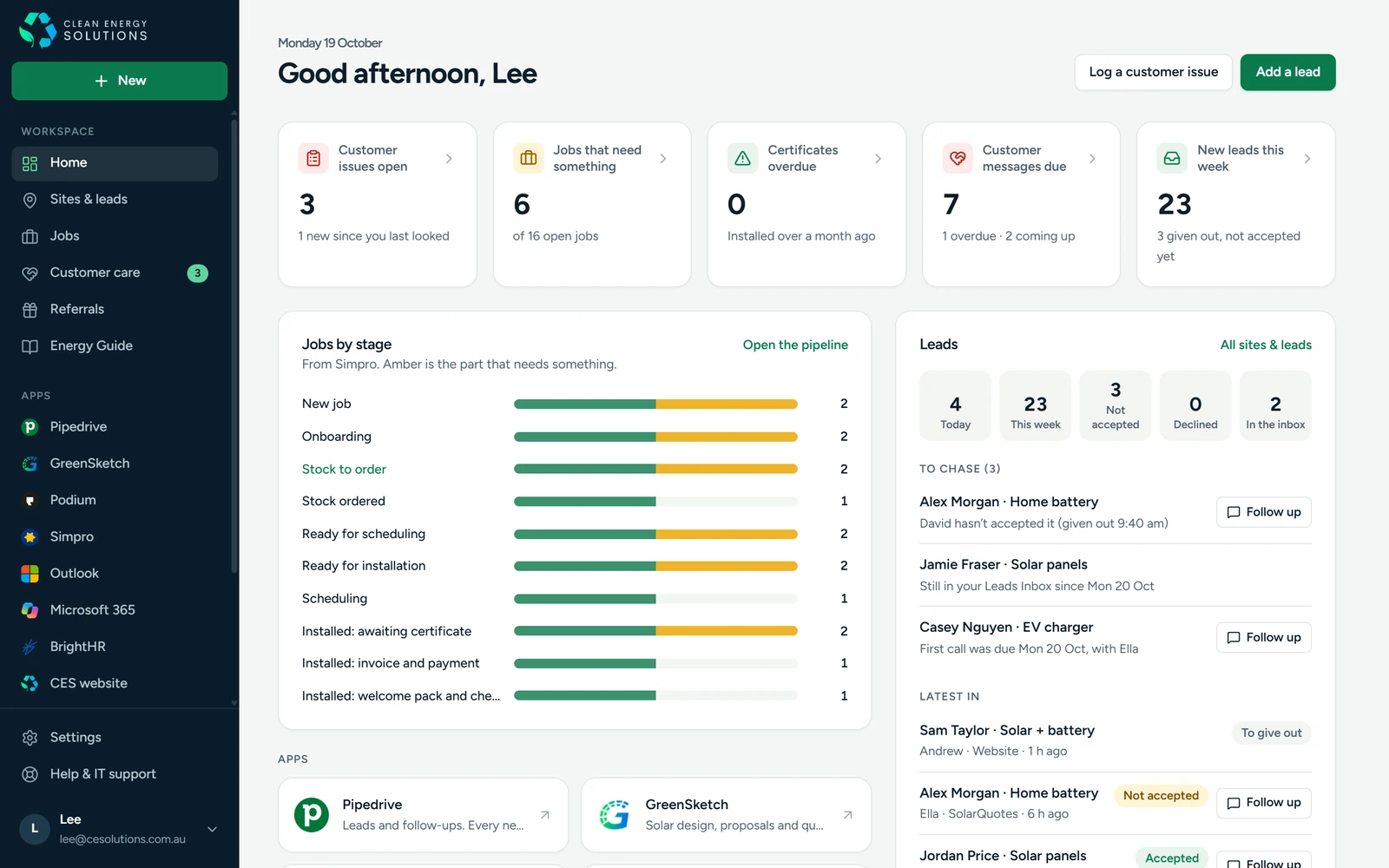
The Clean Energy Solutions staff portal home: open customer issues, jobs that need something, customer messages due, new leads this week, jobs by stage and the leads to chase
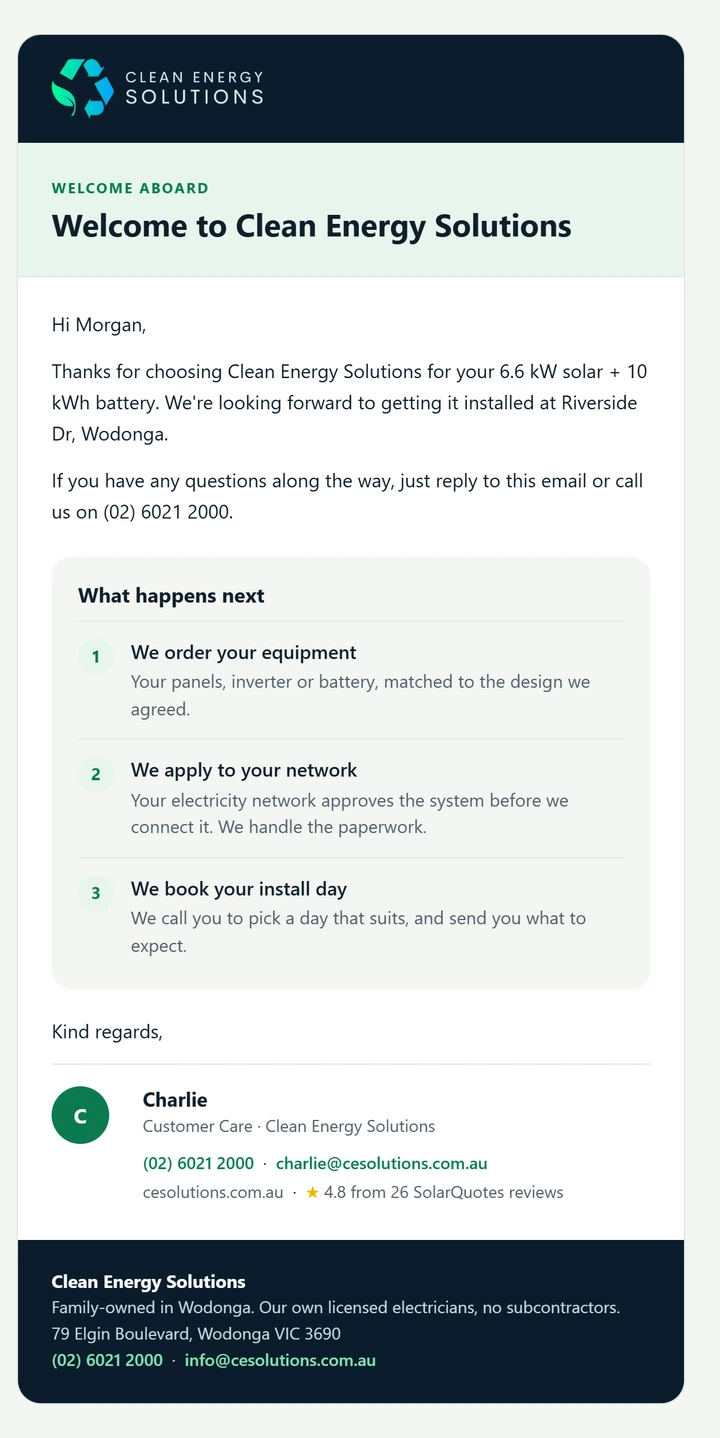
The welcome email every new customer receives, with what happens next
Welcome
  • Lead texted in seconds
  • 1 sign-in
  • 5 customer messages
Client
Clean Energy Solutions
Location
Wodonga, VIC
Scope
Website · CRM · Automation · Integrations
Wired into
Pipedrive · Simpro · Podium · Microsoft 365
01

The situation

Clean Energy Solutions is a family-owned installer in Wodonga with its own licensed electricians. Good at the work, busy, and growing. The systems around the work hadn't kept up.

Before

  • A dated website that didn't say what sets them apart: their own electricians, one-day installs, a shopfront in Wodonga
  • Leads arriving by web form, phone, walk-in and SolarQuotes, and followed up by memory
  • Leads in Pipedrive, jobs in Simpro, texts in Podium: no single view of the business
  • Welcome emails, review requests and check-ins sent when someone remembered
  • Too many tools and logins to find anything

The brief

  • A website that turns visitors into quote requests
  • Every lead in Pipedrive and in front of the right person within minutes
  • One place for the team to see leads, jobs and customers
  • Customer care that keeps in touch on time, and that customer care can change themselves
  • Built on the tools they already pay for, not a new platform to learn
02

Before and after

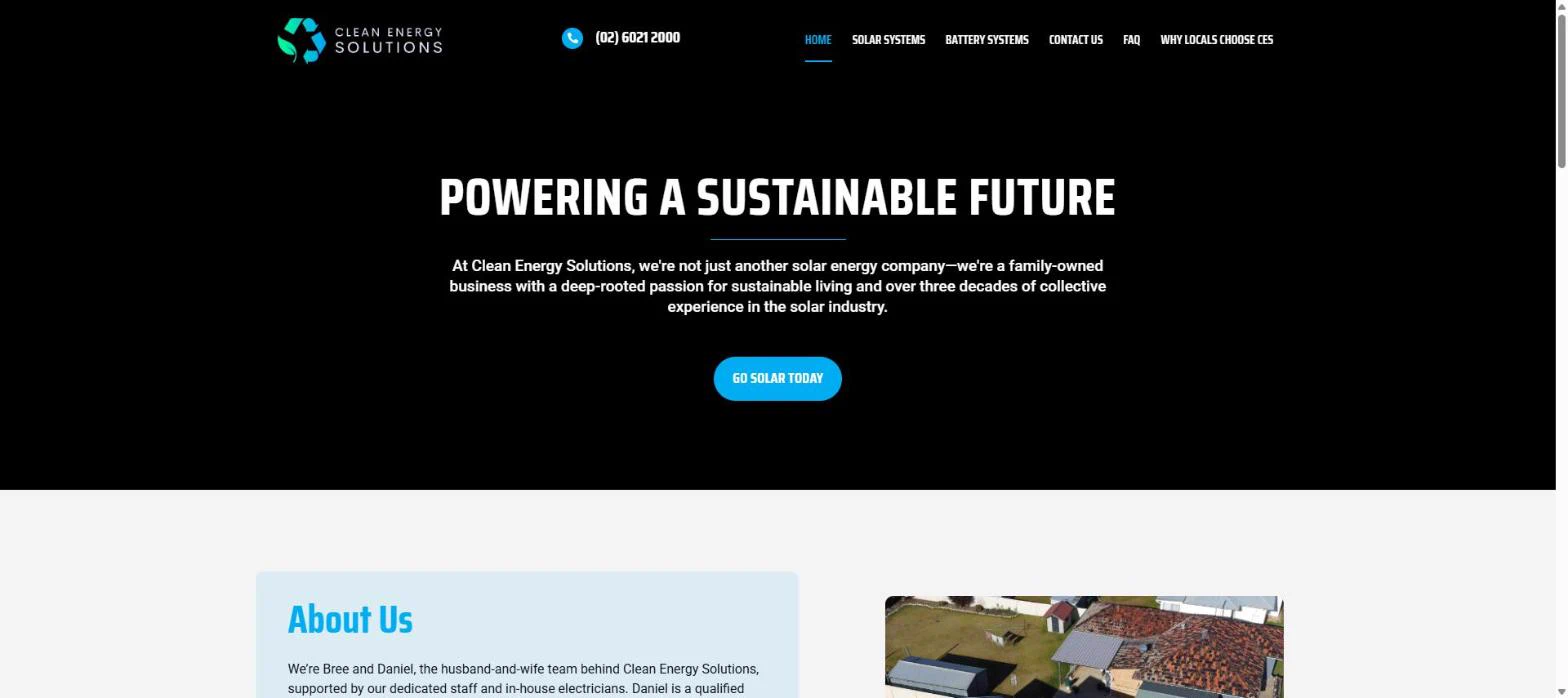
The website first. Same business, same phone number. Drag to compare the old homepage with the new one.
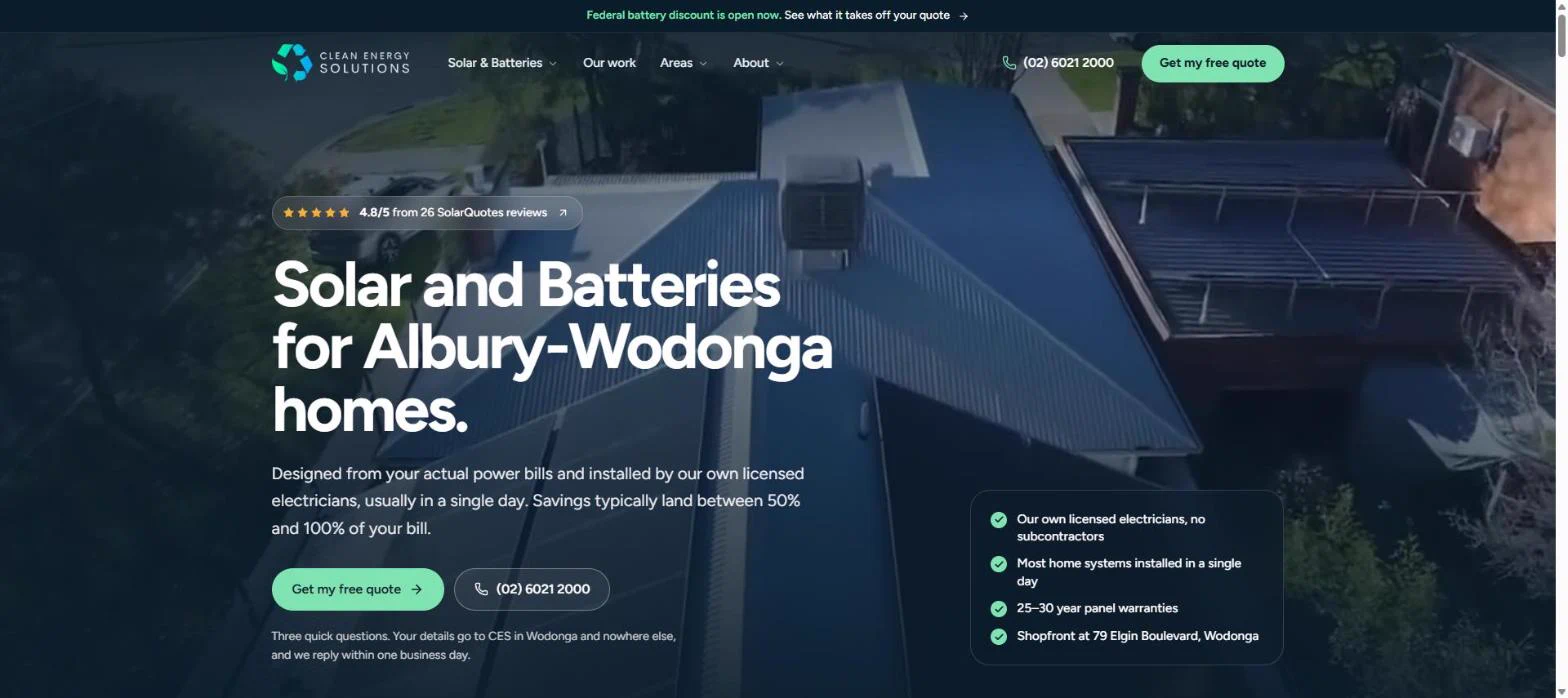
The new Clean Energy Solutions homepage: solar and batteries for Albury-Wodonga homes, with the review score, a free quote button and why they're different
The old Clean Energy Solutions homepage, December 2025: a black banner reading Powering a sustainable future
Before · Dec 2025After · today

The old site from the Wayback Machine, December 2025. The new site live at cesolutions.com.au.

03

What we built

Seven pieces, one system. Each one does a job somebody used to do by hand, and all of it sits behind a single Microsoft sign-in.

  1. EnquiryWebsite, phone, walk-in or SolarQuotes
  2. PipedriveLead created with the address and where it came from
  3. TextOn the sales manager's phone in seconds
  4. AssignedSalesperson texted, accepts from their phone
  5. Site visitBooked, photos and power bill on the lead
  6. Simpro jobTracked stage by stage to install
  7. Customer careWelcome to six-month check-in, on time
01

A website built to bring in quote requests

We rebuilt cesolutions.com.au from scratch: fast on a phone, clear about what makes CES different, and a three-question quote form that goes straight into Pipedrive. Local pages for every town they install in, a savings estimator, and structured data so Google and AI assistants know exactly who they are.

React · NetlifyLocal SEOSchema / JSON-LDllms.txtQuote form → Pipedrive
https://cesolutions.com.au
The new Clean Energy Solutions homepage
02

Every lead caught, and chased automatically

A new lead from any source becomes a Pipedrive lead with its address and source, and the sales manager gets a text within seconds. He gives it out from his phone; the salesperson is texted and accepts it, or passes it back, from their phone. Anything not accepted, or overdue for a call, shows up to chase, with a one-press follow-up by text and email. Every morning he gets a summary of what came in and where it's up to.

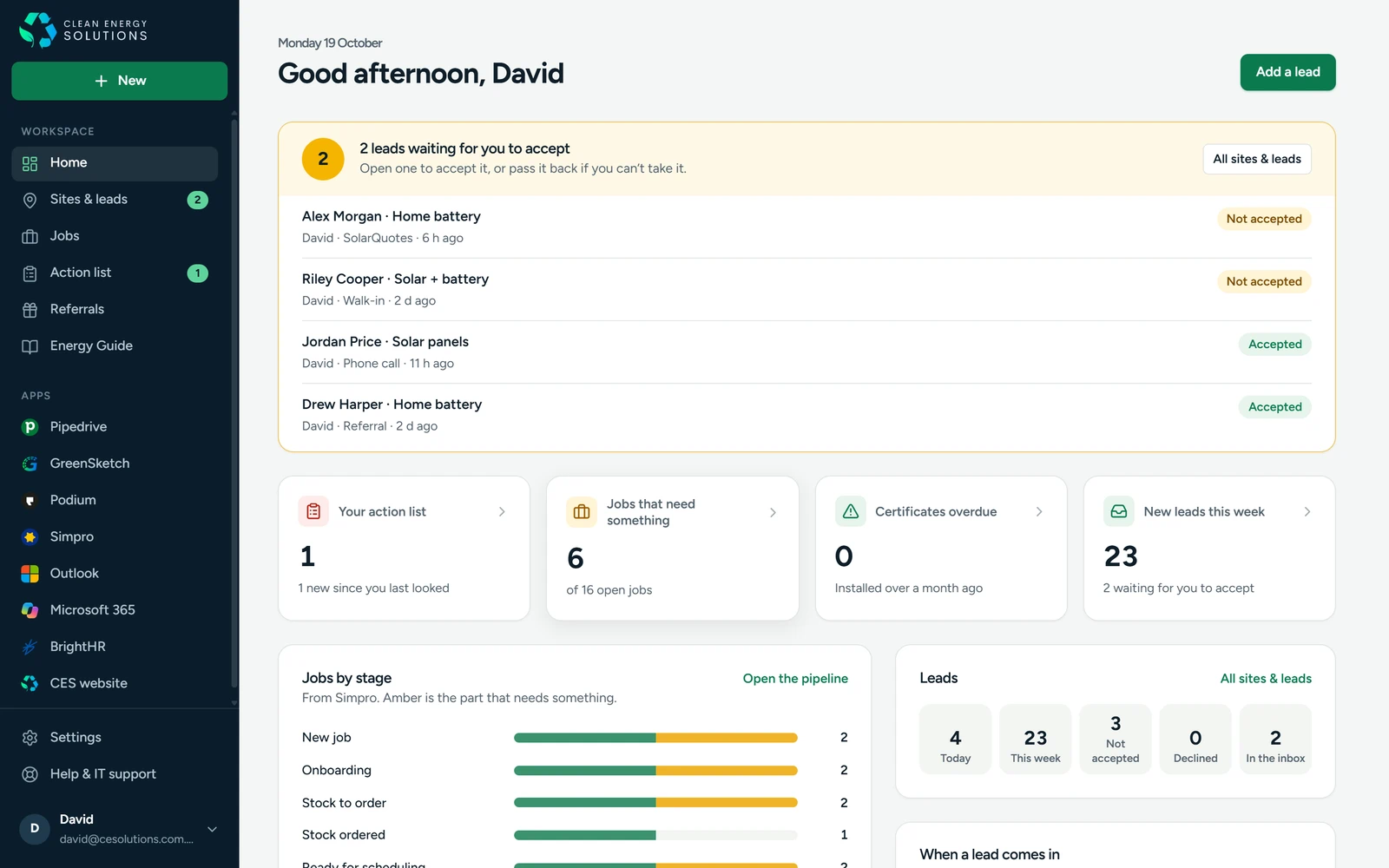
Salespeople sign in to their own leads first, with a count of what's waiting for them.
Pipedrive APIPodium SMSAccept / decline by textMorning summary
staff.cesolutions.com.au
A salesperson's home: two leads waiting to accept at the top, then their action list, jobs and leads
03

One staff portal, one sign-in

The whole team signs in once with their Microsoft account. Home shows what needs them today: customer issues, jobs that need something, customer messages due and new leads, each one a click from the page that deals with it. Every app they use sits in the sidebar. Admins manage people and access in one screen, and can see the portal exactly as any staff member does.

Microsoft sign-inCloudflare AccessRoles and groupsView as someone
staff.cesolutions.com.au
The staff portal home for an admin
04

CES Hub: every site and lead, on any device

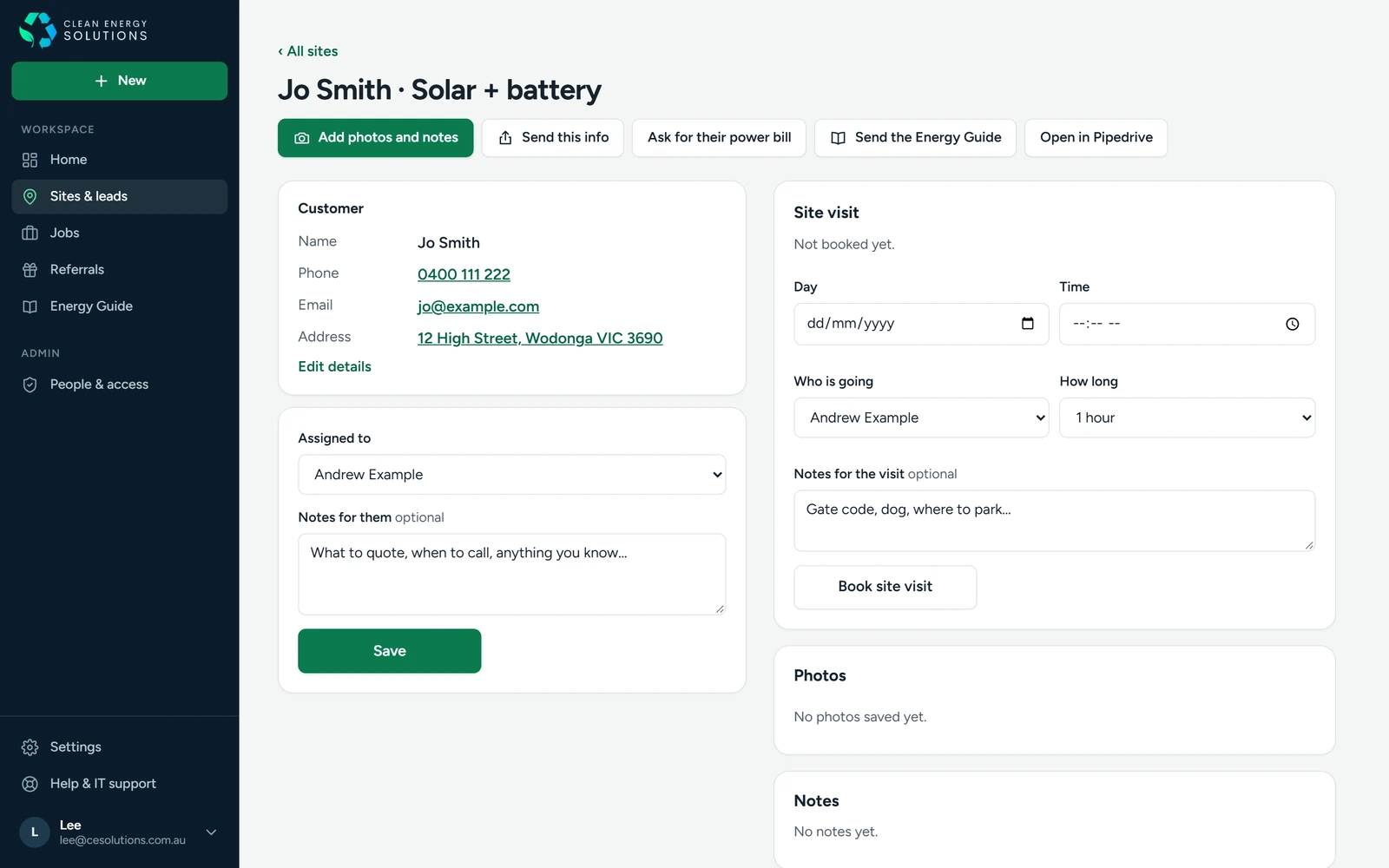
Each lead is a record: the customer, who has it, the site visit, photos from the roof and switchboard, and notes. One click asks the customer for their power bill and meter box photos with their own upload link, and what they send lands on the lead. Another sends them the CES Energy Guide. It works as well on a phone on the roof as it does at a desk.
Site visitsPhoto uploadsCustomer upload linksInstallable web app
staff.cesolutions.com.au/site-visits
A lead in CES Hub: customer details, assignment, site visit booking, photos and notes
05

Simpro jobs in one pipeline

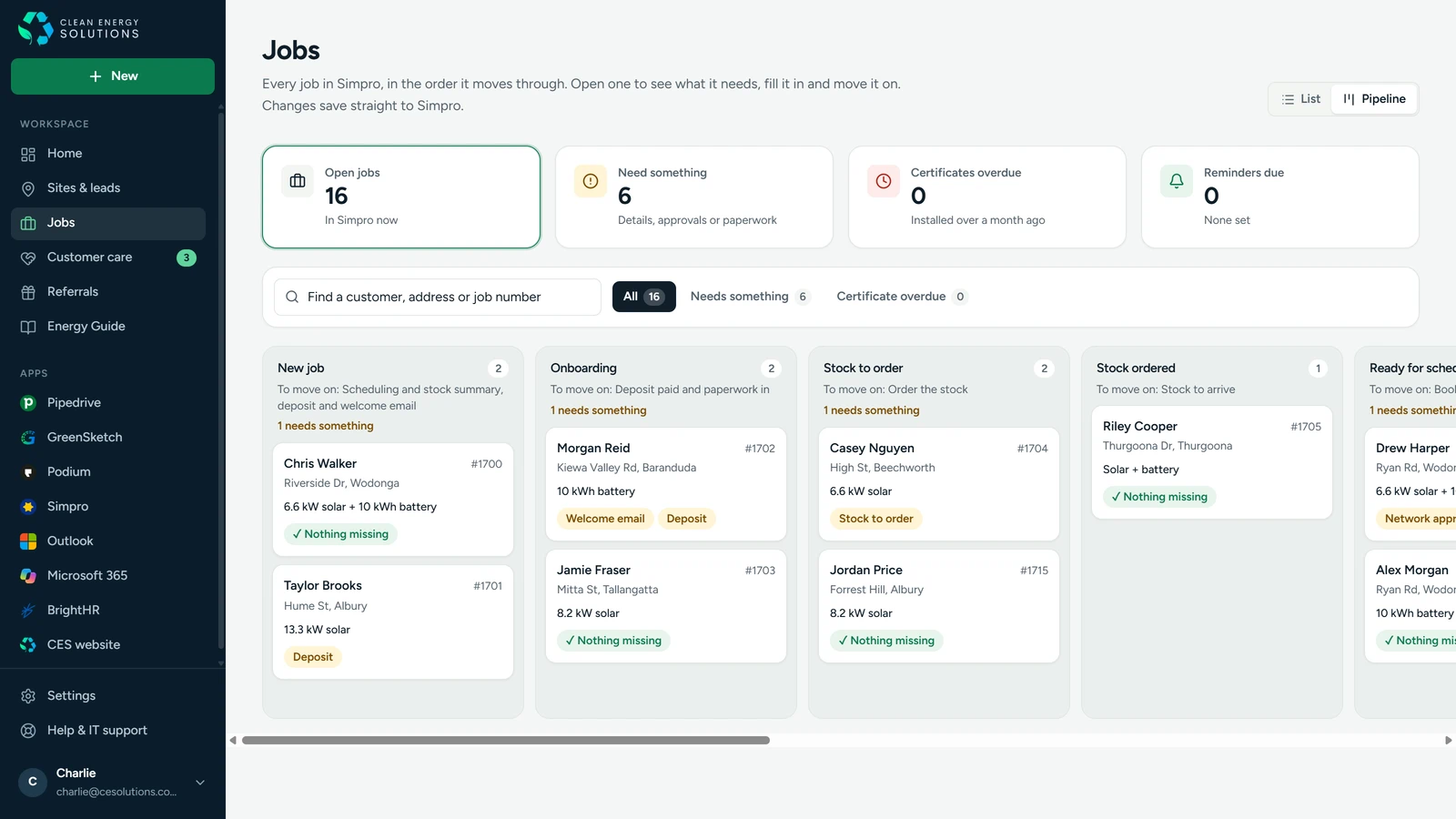
Every open Simpro job, in the order it moves through, with what each one needs before it can move on: deposit, welcome email, stock, network approval, certificate. Open a job to fill in what's missing and it saves straight back to Simpro. Network approvals and status changes arrive as one tidy email instead of a flood, and certificates running late are flagged.
Simpro APIPipeline viewNetwork alertsReminders
staff.cesolutions.com.au/staff-jobs
Simpro jobs as a pipeline: each stage with its jobs and what they need
06

Customer care that keeps in touch on time

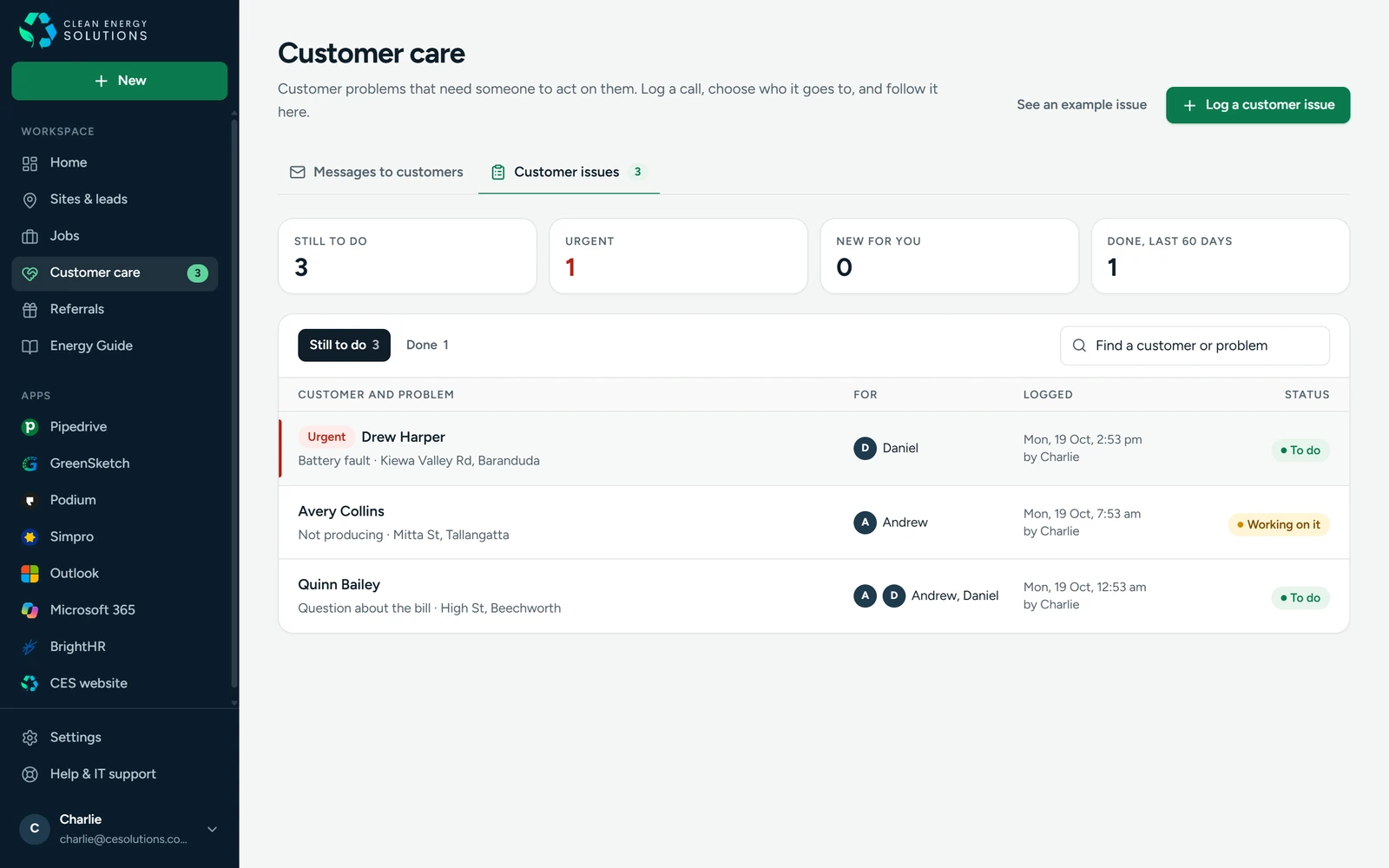
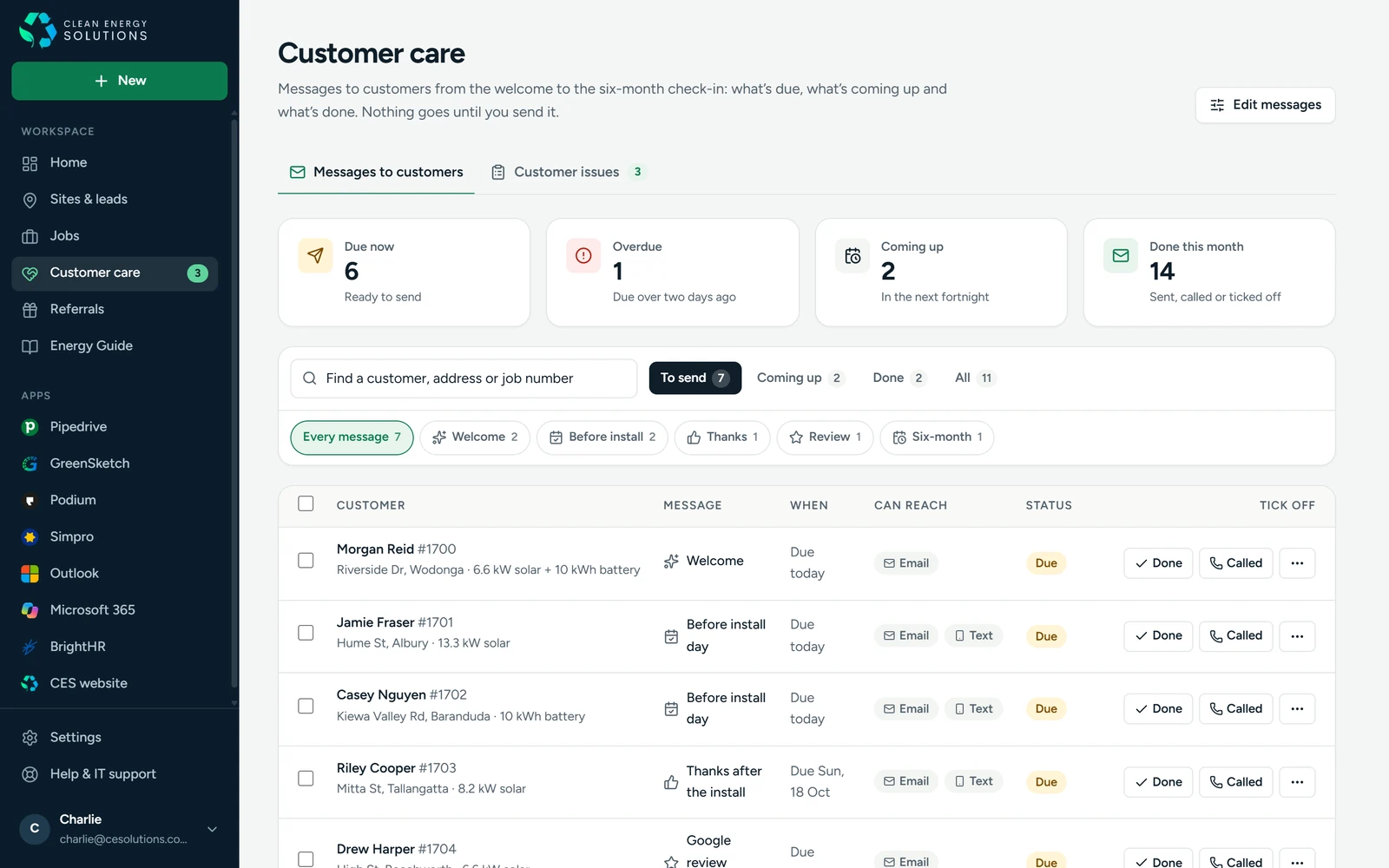
Five messages for every customer, from the welcome to the six-month check-in with a free bill review, each due on its own day. Customer care sees what's due, sends one or fifty at once by email or text, or ticks one off as done or called in one press. Customer problems go on an action list that texts the technician straight away. It's all one Customer care page.
Welcome · install · thanks · review · 6 monthsBulk sendAction listNotes back to Simpro
staff.cesolutions.com.au/staff-care
The customer care list: messages due, overdue and coming up, with Done and Called on every row
07

Emails that look like the business

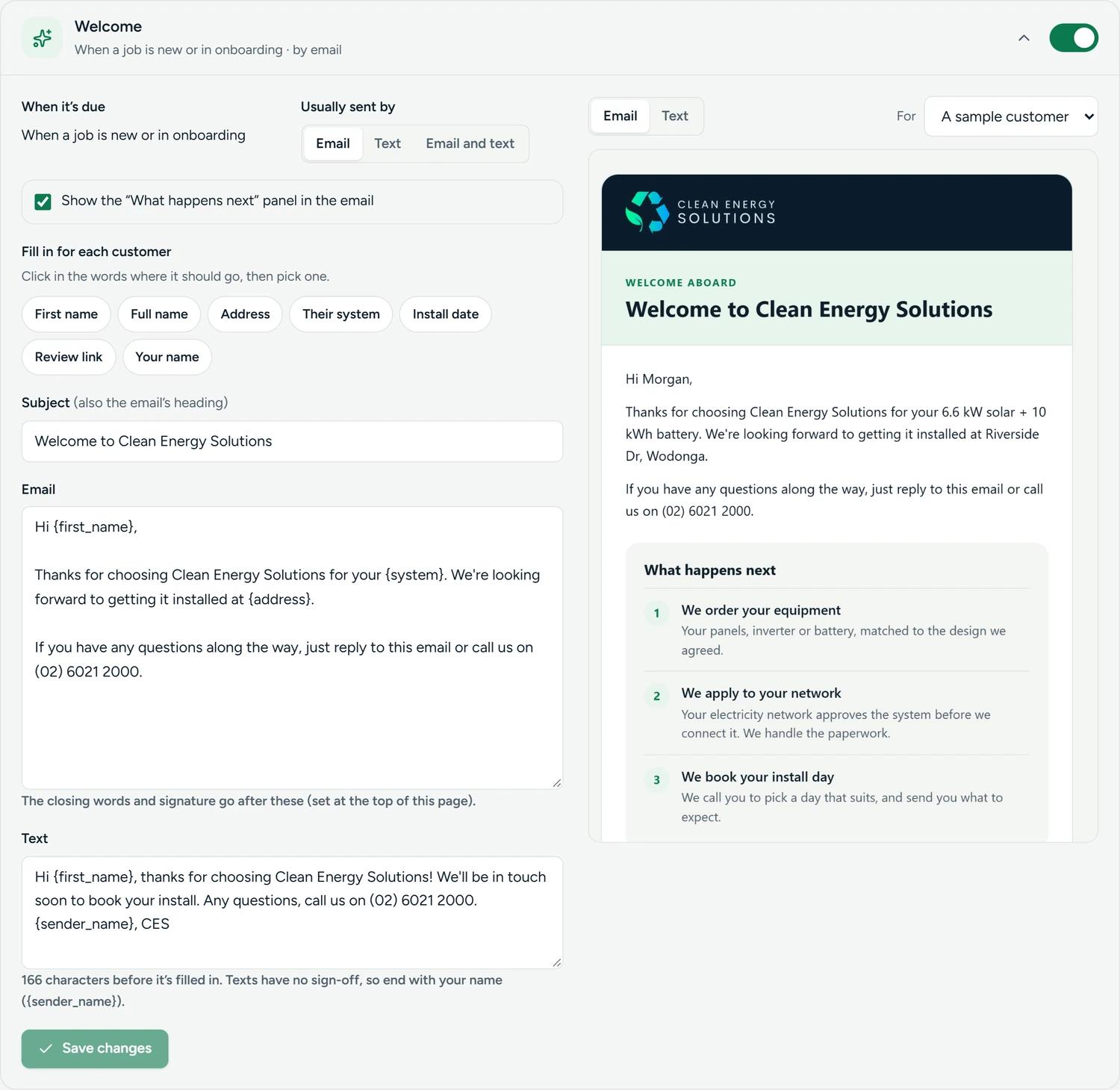
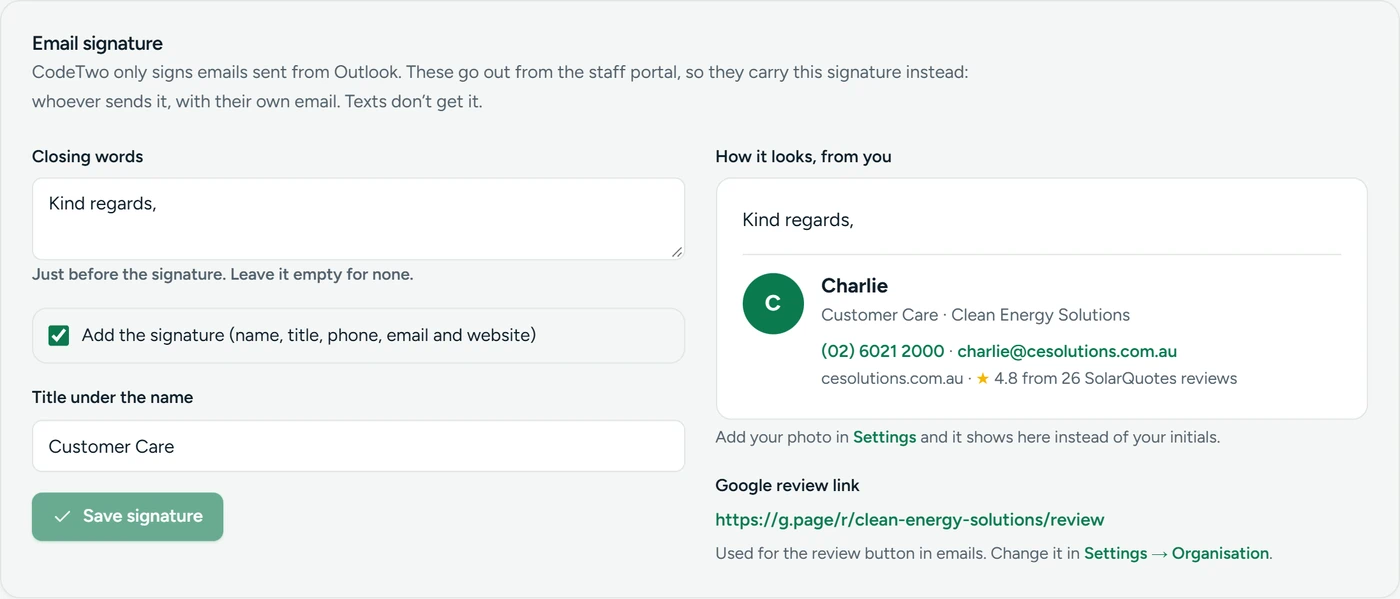
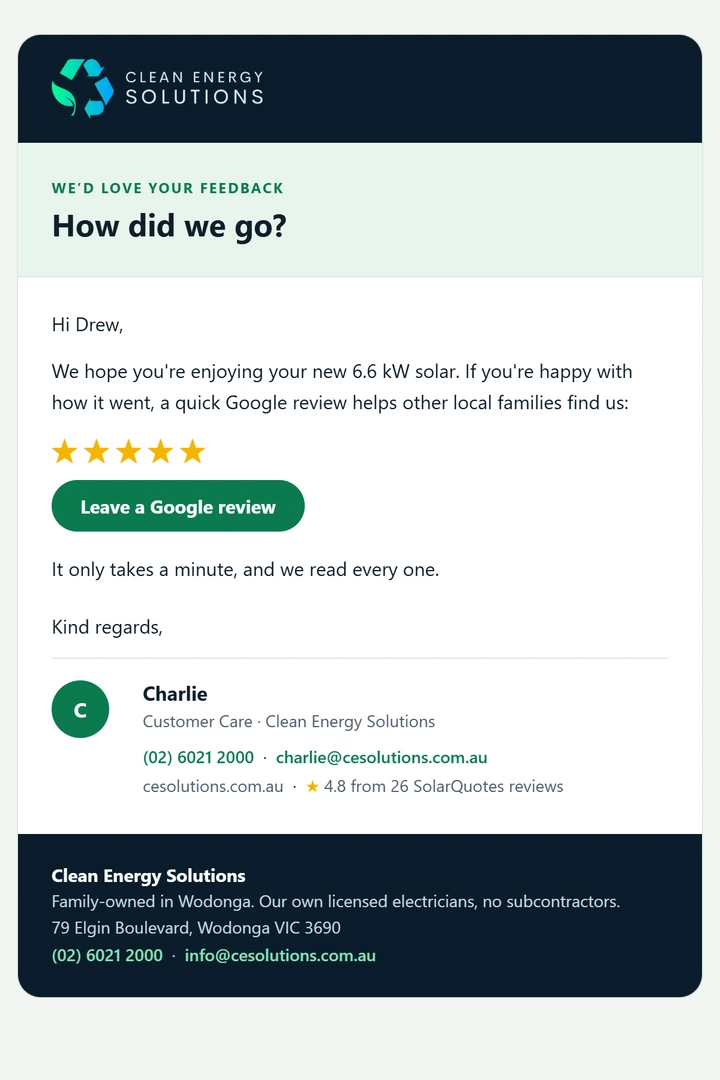
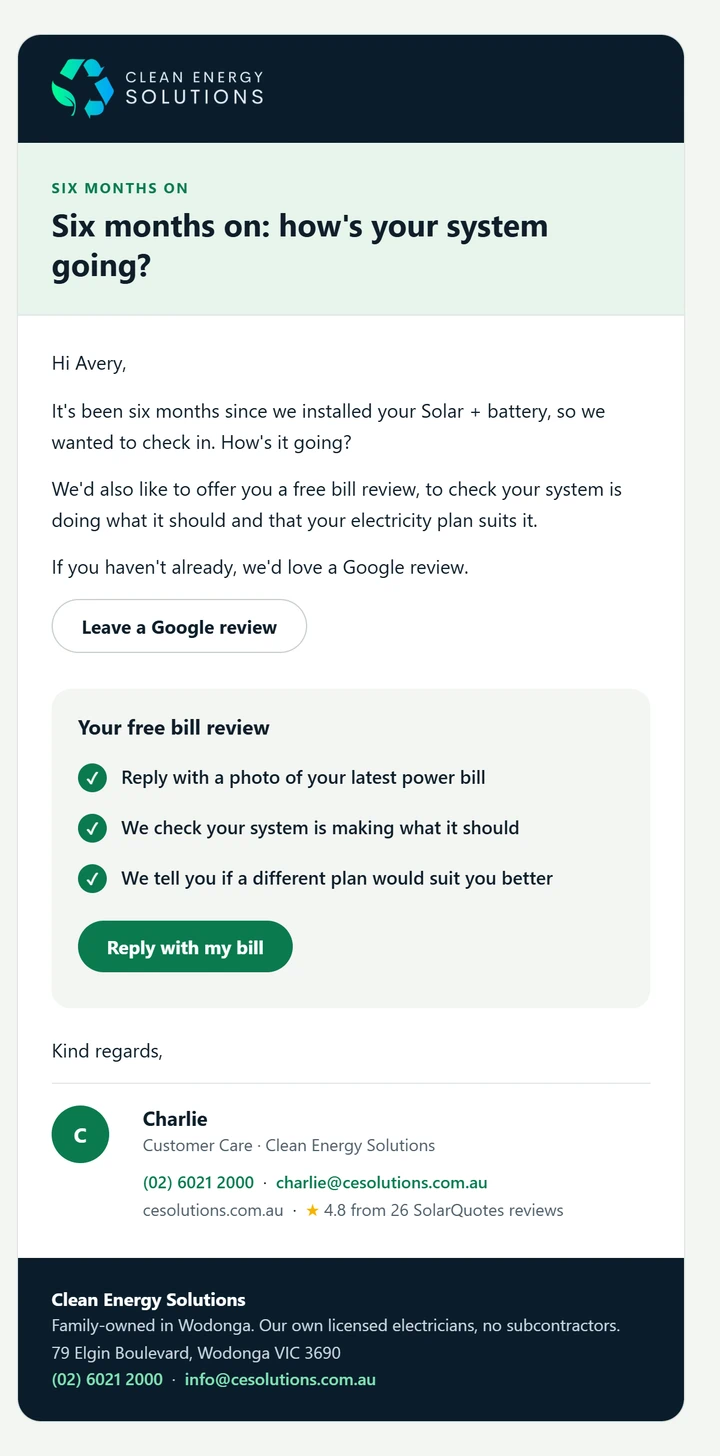
Every customer email is designed: the CES logo, a heading, the message, a panel that helps (what happens next, a checklist for install day, tips for the new system, a big review button, a free bill review), then the sender's own signature with their photo, title and direct email. Customer care changes the wording, timing and sign-off themselves, with a live preview of exactly what the customer will see.
Designed HTML emailStaff photos in signaturesLive previewEditable by the team
The welcome email with what happens next
Welcome
The review request with a Leave a Google review button
Review request
The six-month check-in with a free bill review
Six-month check-in
Customer care · Edit messages
Editing the welcome message: on or off, timing, wording with fill-ins, and the email as it will look
Customer care · Customer issues
The action list of customer issues handed to the technicians
Customer care · Email signature
The email signature settings with a live preview

Every screenshot on this page uses sample data. No real customer details are shown.

04

The result

The office runs from one place now. Nothing about a lead or a customer depends on someone remembering it.

Seconds
From a web enquiry to a text on the sales manager's phone
1
Sign-in for the whole team, every tool in one sidebar
5
Customer messages per job, each sent on its day
4 business systems wired together 185 automated tests guarding it Every page works on a phone 1 press to tick off a follow-up
05

The live site

Built for homeowners on the Border: straight to the offer, proof up front, and a quote form that takes a minute.

https://cesolutions.com.au
The full Clean Energy Solutions homepage built by Automatrix
Scroll the frame to view the full page
06

Under the hood

No new platform to learn. It sits on the tools CES already pays for and connects them.

PipedriveLeads and deals, notes and activities
SimproJobs, customers, statuses and notes
PodiumTexts to staff and customers
Microsoft 365One sign-in for every staff member
CloudflareAccess control and the CES Hub app
NetlifyThe website and the portal's functions
ResendDesigned customer and staff emails
CanvaThe CES Energy Guide, sent from the Hub

Want this for your business?

If your leads, jobs and follow-ups live in five different places and somebody's memory, we can join them up. Tell us how you work and we'll map where it's leaking time and money.

The honesty guarantee: if we can't find at least $10,000 in recoverable time or revenue, we'll tell you upfront. No pitch, no pressure.