
A small participant called "Read" appears in your Teams call. Nobody invited it, nobody knows who owns it, and by the time the meeting ends it has emailed a summary of your client conversation to everyone on the invite. That experience is why "is Read AI safe" gets searched so often, and the answer splits cleanly: the encryption is fine, the default behaviour is the problem.
SECTION 01The short answer
Read AI is a legitimate product from a real company with SOC 2 audits behind it. It is not malware and it is not stealing your data. The reason IT teams keep blocking it is narrower: a single OAuth click gives it calendar access, its auto-join setting then sends a recording bot into meetings the user never attends, and the captured data lands in the United States by default. For an Albury tradie summarising internal catch-ups, that risk sits near zero. For an accountant, a broker, a clinic or anyone discussing a third party's personal information on a call, it becomes a decision you should make deliberately instead of inheriting from whoever clicked first.
Read AI is safe enough to use and risky enough to configure. Turn auto-join off, announce the recording, and if you are already paying for Microsoft 365 or Zoom, you are paying for a notetaker that keeps the data closer to home.
SECTION 02What Read AI actually does
Read AI connects to your calendar, sends a bot into Zoom, Microsoft Teams and Google Meet calls, and produces transcripts, summaries, action items and engagement scoring for each participant. It also plugs into Gmail, Slack and a long list of other tools. The transcription quality is good and the summaries are useful, which is exactly why it spreads through an organisation faster than anyone reviews it.
Read's own position is worth stating fairly. The company says it does not use meeting content for training unless you explicitly opt in, that the bot appears as a visible participant, and that any attendee can remove it or delete the meeting data. In Google Meet and Microsoft Teams, one participant objecting is enough to keep it out. None of that is marketing spin, and it puts Read ahead of several competitors on paper.
SECTION 03Why it turns up uninvited
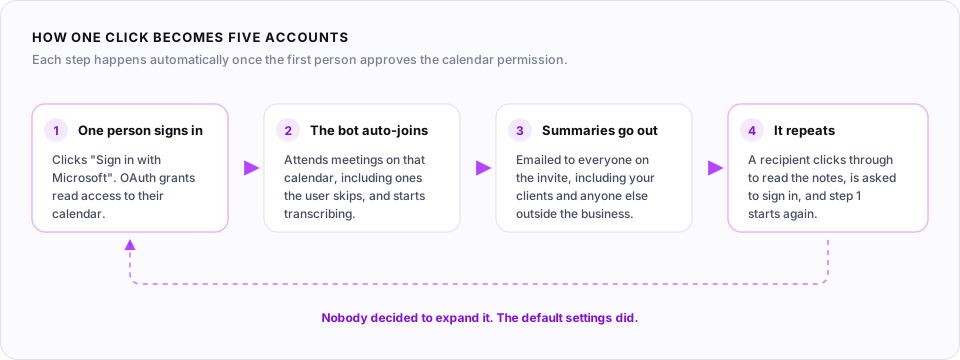
The mechanism is worth understanding, because it explains almost every complaint. One person signs up, usually through a "Sign in with Microsoft" button that looks like any other login. That grants OAuth access to their calendar. Auto-join is the default posture, so the bot starts attending scheduled meetings on that calendar, including ones the user skips.
Then the summary email goes out to everyone on the invite, internal and external. A curious recipient clicks the link, gets asked to sign in with Microsoft to view the notes, and a second connected account exists. One cloud consultant writing about it compared the spread to a digital cold. It travels through your client list as readily as your staff list, which is the part that turns an individual choice into an organisational one.
Admins reach for Teams meeting policies first, and that is the wrong lever. Tightening lobby settings so only your org can bypass the wait screen also locks out the clients you want in the call. OAuth consent is where this actually gets controlled, in Entra ID under user consent settings for third-party applications.
SECTION 04Who has already blocked it
In August 2025, Chapman University investigated Read AI after repeated reports of it appearing in Zoom and Teams meetings, and prohibited it over security, privacy and institutional data risks. Its IT team blocked the app in both platforms and pointed staff to Zoom AI Companion instead, on the condition that everyone in the meeting consents first.
The University of Washington reached the same conclusion. UW-IT's notice acknowledges the tool is useful, then blocks it: once Read AI is tied to your calendar it can join, transcribe and summarise meetings you are not attending, without other attendees knowing or agreeing, and summaries can be shared with participants automatically unless it is configured carefully. UC Davis and UW-Madison have published advisories telling hosts how to remove the bot mid-meeting rather than banning it outright.
Universities are not businesses, and a ban at Chapman does not mean the tool is unsafe for a two-person agency in Wodonga. What it does tell you is that organisations with a compliance function looked at this specific product and decided the auto-join model was not worth the exposure.
SECTION 05Where your meeting data ends up
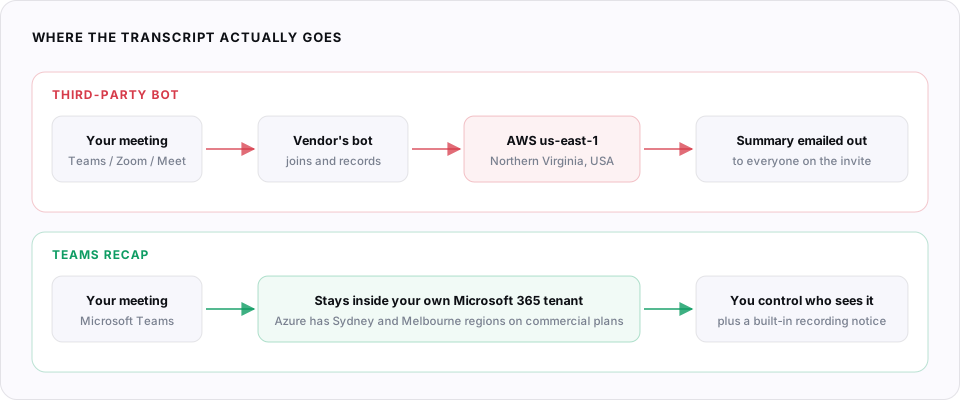
Read AI documents this clearly, which is more than many competitors manage. Captured data is encrypted in transit and stored encrypted at rest in the AWS us-east-1 datacentre in Northern Virginia. The company runs regular SOC 2 audits and penetration tests, states GDPR compliance, publishes a subprocessor list, and offers custom retention policies on request. Storage in another region is available for large purchases if you ask sales. HIPAA business associate agreements exist only on annual Enterprise+ plans.
Two things follow from that for an Australian business. First, your client conversations sit offshore unless you negotiate otherwise. Second, and this is the part most people miss, moving data into an Australian region would not fully solve it anyway. The US CLOUD Act reaches providers under United States jurisdiction regardless of where the bytes physically sit, and the Australia-United States CLOUD Act Agreement that came into force on 31 January 2026 streamlines those government-to-government requests rather than shielding you from them.
| Question | Read AI's position | What it means for you |
|---|---|---|
| Where is data stored? | AWS us-east-1, Northern Virginia | Cross-border disclosure under APP 8 applies |
| Is it used for training? | No, unless you opt in explicitly | Better than several competitors, worth verifying in your settings |
| Independent audit? | Regular SOC 2 audits and pen tests | Ask for the current Type II report before you sign anything |
| Retention control? | User-set, custom policies on request | Set it deliberately, the default keeps recordings around |
| Can participants opt out? | Yes, any attendee can remove it | Only helps people who notice the bot is there |
SECTION 06Recording law: NSW and Victoria disagree
This matters more on the border than almost anywhere else in the country, because an Albury business and a Wodonga business sitting fifteen minutes apart operate under different rules for the same call.
New South Wales
- Section 7 of the Surveillance Devices Act 2007 makes it an offence to record a private conversation without consent
- Being a participant is not by itself a defence
- Exceptions include express or implied consent from all principal parties, or a recording reasonably necessary to protect your lawful interests
- Implied consent generally means people were told and continued anyway
- Publishing or sharing the recording is regulated separately
Victoria
- Under the Surveillance Devices Act 1999, a participant may generally record a private conversation they are part of
- Queensland and the Northern Territory take the same approach
- Recording a conversation you are not part of still requires everyone's consent
- Separate rules restrict communicating or publishing the recording
- Lawful to record does not mean fair to record
An AI bot that joins a NSW client call and starts transcribing before anyone mentions it is squarely in the territory section 7 was written about. The practical fix costs nothing: say at the top of the call that notes are being recorded, give people the chance to object, and note it in the minutes. Announcing it is the whole difference between implied consent and a problem.
SECTION 07The Privacy Act part
Businesses turning over $3 million or less are generally exempt from the Privacy Act 1988, which covers a large share of Albury Wodonga. That exemption has holes, and they are getting bigger. It never applied to businesses handling health information or trading in personal information. From 1 July 2026, real estate professionals, lawyers, accountants, conveyancers and dealers in precious metals became reporting entities under AML/CTF reforms regardless of turnover. The government has agreed in principle to removing the general small business exemption, with no commencement date legislated yet.
If the Act applies to you, Australian Privacy Principle 8 is the one that bites. It does not prohibit sending personal information overseas, but it leaves you accountable for how the overseas recipient handles it. A transcript of a call where you discussed a client's finances, health or tenancy is personal information, and the fact that a third-party bot collected it does not shift the responsibility off your business.
The OAIC published two AI guidance notes in October 2024, one aimed specifically at organisations using commercially available AI products including note-taking and transcription tools. The regulator's advice is a cautious approach proportionate to risk, and it recommends against putting personal information, particularly sensitive information, into publicly available generative AI tools at all.
A statutory tort for serious invasions of privacy commenced on 10 June 2025. Individuals can now sue directly for up to $478,550 without proving financial loss, and it reaches beyond APP entities, so the small business exemption does not shield you from it. Recording someone who had a reasonable expectation of privacy is exactly the kind of conduct it was written for.
SECTION 08The lawsuit wave
Read AI is not a defendant in any of these, and that is worth saying plainly. The category around it is being litigated hard, which is the better signal of where the risk sits.
Four suits against Otter.ai filed between August and September 2025 were consolidated in the Northern District of California, alleging its bot recorded and transcribed Zoom, Teams and Meet conversations without meaningful consent from everyone present. Fireflies.ai faces biometric claims in Illinois over voiceprints generated by its speaker recognition feature, brought by a plaintiff who never had an account and simply joined a meeting where the bot was enabled. Granola was sued in the same California district. Microsoft was sued in February 2026 over Teams speaker diarization creating voiceprints, so no vendor in this space is untouched.
The common thread in every complaint is consent: whether the person whose voice was captured ever agreed. Australian law reaches the same question by a different route through the Surveillance Devices Acts and the new statutory tort. Whichever tool you pick, the announcement at the start of the call is doing most of the protective work.
SECTION 09How to get it out of your meetings
Removing the bot from one call does nothing about the connection that sent it. Work through these in order, because stopping at step one leaves a ghost bot that keeps joining.
In Zoom, open the participant list, click the three dots next to Read and remove it. In Teams and Google Meet, remove it the same way you would any participant. Then check the meeting chat, which usually shows who invited it, and have a quiet word with that person rather than the whole room.
SECTION 10Safer alternatives
"Safer" here means fewer parties holding your data and clearer consent, not better transcription. Most businesses already own a decent option and have not turned it on.
| Option | Where the data sits | Best for |
|---|---|---|
| Teams recap / M365 Copilot | Your own tenant. Azure has Sydney and Melbourne datacentres, with in-country processing available for Azure OpenAI models on commercial plans | Anyone already paying for Microsoft 365. No third-party bot, admin controls, built-in recording notice |
| Zoom AI Companion | Zoom's platform, controlled at account level by your admin | Zoom-first businesses. This is what Chapman recommended when it prohibited Read AI |
| Gemini in Google Meet | Google Workspace, with an Australian region available for data at rest on paid plans | Workspace shops that want notes without adding a vendor |
| Local transcription | Your own machine. Nothing leaves the device | Legal, health, HR and anything where APP 8 would be a headache |
| Third-party bots | Vendor's US infrastructure by default | Convenience, if you accept the accountability that comes with it |
For most of the Albury Wodonga businesses we work with, the answer is the boring one. You are already licensed for Teams. Turn on recording with the notice banner, use intelligent recap, and the transcript never leaves the tenant you already trust with your email. It costs nothing extra and it removes the awkward conversation where a client asks who else has a copy of the call.
SECTION 11Keeping it, configured properly
Plenty of people will read all of the above and still prefer Read AI, usually because the summaries are genuinely good and the integrations save real time. That is a defensible choice. Make it a configured one.
That last one gets skipped constantly. If you tell clients how you handle their information and a US vendor now holds transcripts of your calls with them, the policy is out of date. Fixing it takes a paragraph. Explaining why it was missing takes considerably longer.
COMMON QUESTIONSFrequently asked
Is Read AI safe to use?
Read AI runs SOC 2 audits, encrypts data in transit and at rest, and says it does not train on meeting content unless you opt in. The risk is not the encryption, it is the behaviour: once you connect a calendar it can auto-join meetings you are not attending, and meeting data is stored in AWS us-east-1 in Northern Virginia by default. Several US universities including Chapman and the University of Washington have blocked it over institutional data risk. For an Australian business handling client information, that combination is worth a decision rather than a default.
Why did Read AI join my meeting when nobody invited it?
Someone on the invite list connected their calendar to Read AI, usually through a Sign in with Microsoft or Google prompt. That single OAuth consent gives Read AI read access to their calendar, and its auto-join setting then sends the bot to meetings on that calendar, including ones the user does not attend. It spreads further because summary emails go to everyone on the invite and each recipient who clicks through is asked to sign in, creating another connected account.
Is it legal to record a meeting with an AI notetaker in Australia?
It depends on the state. In Victoria, Queensland and the Northern Territory a participant may generally record a private conversation they are part of. In New South Wales, section 7 of the Surveillance Devices Act 2007 makes it an offence to record a private conversation without the consent of all principal parties, even if you are one of them, unless an exception applies such as the recording being reasonably necessary to protect your lawful interests. Announcing the recording at the start and letting people object is the practical fix, and separate rules restrict sharing or publishing a recording even when it was lawfully made.
Where does Read AI store my meeting data?
Read AI states that captured data is stored encrypted at rest in the AWS us-east-1 datacentre in Northern Virginia, USA. Other storage locations are available on request for large purchases. Under Australian Privacy Principle 8, sending personal information overseas leaves your business accountable for how the overseas recipient handles it, so the storage location matters even though the Privacy Act does not ban offshore processing.
What is a safer alternative to Read AI for Australian businesses?
If you already run Microsoft 365, Teams intelligent recap and Copilot keep the transcript inside your own tenant, and Microsoft Azure has data centres in Sydney and Melbourne with in-country processing available for Azure OpenAI models on commercial plans. Zoom AI Companion is the equivalent for Zoom shops and is what Chapman University recommended when it prohibited Read AI. For legal, health or HR conversations, local transcription on your own machine avoids the cross-border question entirely.
How do I stop Read AI from joining my meetings?
Turn off auto-join inside Read AI settings, then revoke the calendar permission at the source: Google Account security settings for Google Calendar, or Entra ID enterprise applications for Microsoft 365. Remove the Zoom or Teams app and the Chrome extension, and delete the Read AI account if you no longer want it. Admins should also restrict user consent for third-party apps in Entra ID, otherwise the next person to click Sign in with Microsoft reconnects it.
REFERENCESSources
[1] Chapman University Information Systems & Technology, security notice regarding Read AI, August 2025.
[2] UW-IT, Read AI deactivation notice, University of Washington.
[3] Read AI Help Center, Security & Privacy Overview and meeting join preferences documentation.
[4] Surveillance Devices Act 2007 (NSW) s7; Surveillance Devices Act 1999 (Vic) s6.
[5] OAIC, Guidance on privacy and the use of commercially available AI products, 21 October 2024.
[6] OAIC, Statutory tort for serious invasions of privacy, commenced 10 June 2025.
[7] In re Otter.AI Privacy Litigation, No. 5:25-cv-06911 (N.D. Cal.); Cruz v. Fireflies.AI Corp., No. 3:25-cv-03399.
[8] Australia-United States CLOUD Act Agreement, in force 31 January 2026.
Not sure what your team has already connected?
Most businesses find at least one AI tool holding data nobody approved. We audit what is connected to your Microsoft 365 or Google Workspace tenant, tell you what it can see, and set up a notetaker that keeps the transcript where it belongs. Free, and you keep the findings either way.
Not ready to talk? Run the free AI visibility check instead. Thirty seconds, no call, and it tells you whether ChatGPT and Google’s AI currently name your business.